Search....

Kon-Boot 2.1 - Bypass Log On Password of Windows

A computer screen showing the Proseware reader in operation. Image copyright (c) 2009.
Kon-Boot is an application which will silently bypass the authentication process of Windows based operating systems. Without overwriting your old password! Easy to use and excellent for tech repairs, data recovery and security audits.
Commercial Kon-Boot version works with both 64-bit and 32-bit Microsoft Windows operating systems and also include privilege escalation and sticky keys feature.

What's new in version V2.1?
- Windows 8 support (only standard BIOS, no EFI support)
- Sticky keys feature* (see our new video)


System Requirements :-
 
Kon-boot supports following operating systems:


  • Microsoft Windows XP 32Bit/64Bit (all versions since SP2)
  • Microsoft Windows Server 2003 32Bit/64Bit (all versions)
  • Microsoft Windows Server 2008 32Bit/64Bit (all versions)
  • Microsoft Windows Vista 32Bit/64Bit (all versions)
  • Microsoft Windows 7 32Bit/64Bit (all version)
  • Microsoft Windows 8 32Bit/64Bit (all versions, only standard BIOS support - no EFI)

    Additional requirements: Pentium III compatible processor, 10MB free space on the hard drive. CD-ROM, Floppy Drive or USB flash drive, keyboard, Internet connection (for product download). Compatibile BIOS version.

  • HOMEPAGE 

    DOWNLOAD (FULL VERSION)
    READ MORE - Kon-Boot 2.1 - Bypass Log On Password of Windows

    DNS Jumper Terbaru

    Download DNS Jumper Versi Terbaru V1.0.3 bagi anda yang suka menggunakan software dan tool pendukung untuk aktifitas setting ip dns pada komputer secara otomatis, software ini sangat mendukung mobilitas kita dan mempermudah kerja anda dalam menyetting secara otomatis dns yang terdapat pada LAN komputer, fungsi dari DNS Jumper Terbaru ini juga banyak dan fasilitas dari lan maupun wireless yang di support pun banyak sekali, kita tinggal memilih salah satu diantara lan card dan wireless card anda untuk mengganti DNS tersebut, daripada kita bolak – balik buka setting control panel >> lan >> properties dan mengisikan dns, lebih baik dan cukup efisien serta cepat kalo menggunakan DNS Jumper Versi Terbaru ini.
    Cara Menggunakan DNS Jumper juga lebih mudah dibandingkan kita mesti mondar – mandir isi dan ubah dns pada lan maupun wifi anda, cukup dengan menginstall program dns jumper tersebut ke komputer anda dan isikan dns yang di kehendaki, misal dns google dengan mengisikan 8.8.8.8, saya rasa anda pasti akan mengerti, palagi software dns jumper juga cocok bagi para admin hotspot untuk mengatur dns ketika mau masuk di winbox mikrotik, nah coba anda lihat saja seperti gambar dibawah ini salah satu contoh memasukan dns jumper yang benar.
    A computer screen showing the Proseware reader in operation. Image copyright (c) 2009.
    untuk dapat mendownload file dns jumper silahkan klik disini DOWNLOAD DNS JUMPER VERSI TERBARU.
    sekian dulu, di lain waktu kita akan kupas bagaimana cara menggunakan DNS Jumper Versi Terbaru tersebut.
    READ MORE - DNS Jumper Terbaru

    cara menghilangkan lock screen windows 8

    A computer screen showing the Proseware reader in operation. Image copyright (c) 2009.
    jika kamu ingin menghilangkan LOCK SCREEN di windows 8 silahkan ikuti tutorial berikut:
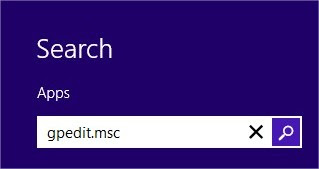
    1. Click Search pada bottom-right corner di screen. kemudian ketik gpedit.msc dan tekan enter.

      Search Field

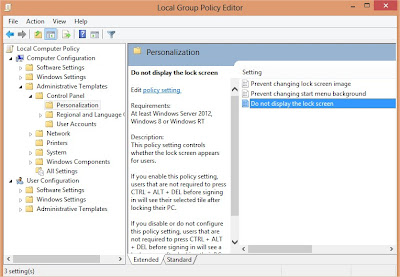
    2. ikuti langkah berikut sekarang ke Computer Configuration\Administrative Templates\Control Panel\Personalization.
      Personalization windows 8

    3. Double click pada Do not display the lock screen option, ubah menjadi Enabled dan klik  Apply dan OK

      Enabled

    4. Restart computer
    READ MORE - cara menghilangkan lock screen windows 8

    YouTube Downloader full version

    A computer screen showing the Proseware reader in operation. Image copyright (c) 2009.

    YouTube Downloader allows you to download videos from YouTube, including HD and HQ videos, Facebook, Vevo, and dozens of other video sites and convert them to other video formats. The program is easy to use--just specify the URL for the video you want to download and click the Download button. The program also allows you to convert downloaded videos for iPod, iPhone, PSP, Cell Phone, Windows Media, XVid and MP3, or play video that you have previously downloaded or converted.


    A computer screen showing the Proseware reader in operation. Image copyright (c) 2009.

    Get High Definition Video
    Download High-Def (HD) 1080P videos from YouTube and all other major video streaming sites with YouTube Downloader. Watching HD YouTube videos from your laptop or mobile device with our YouTube converter has never been easier!
     
    Download and Watch Later
    Never worry about missing a video, or having to watch YouTube clips on their time. With YouTube Downloader, you can save videos. Our software acts as a YouTube converter as well, and lets you convert YouTube videos easily, viewing them at any time you want!
     
    Converter Works with Most Formats
    YouTube Downloader's unique software downloads content from all the major video streaming sites, not only YouTube. It also acts as a YouTube Converter, where you can convert your movie files into any number of formats, including YouTube to MP3, MP4, 3GP, MPEG and even YouTube to AVI.
     
    Watch on Other Devices
    When you download YouTube videos using our free YouTube Downloader, it doesn't mean you have to watch them on one device. YouTube Downloader is a video converter that turns files into playable, portable video formats - so you can convert YouTube to iPod, iPhone, PSP and even YouTube to iTunes.
    It's Fast and Easy to Use
    The YouTube Downloader interface is intuitive and easy to use. Users simply copy and paste a video URL, then click the Download button.
     
    Video Player Integrated
    Our free YouTube Converter will also save files onto its extensive database, allowing you to build a player to categorize and sort your favorite videos, just like you would using iTunes! 

    DOWNLOAD
     DOWNLOAD MEDICINE
    OR
    READ MORE - YouTube Downloader full version

    Cara unlock atau membuka file pdf yang diproteksi secara online


    A computer screen showing the Proseware reader in operation. Image copyright (c) 2009.
    Data yang kita miliki haruslah kita jaga dan kita pelihara. Salah satu cara untuk mengamankan data adalah dengan memproteksi file tersebut agar tidak bisa di copy paste, tidak bisa dicetak. Atau bisa dikatakan file pdf tersebut sebagai file Read Only (hanya bisa dibuka saja, selebihnya tidak bisa diapa-apakan).
    Apabila anda memiliki file pdf yang read only seperti tersebut diatas, dan anda ingin mencetak atau melakukan copy paste, maka trik untuk unlock file pdf ini mungkin bisa menjadi salah satu alternative solusi untuk mengatasi hal tersebut. Cara yang dmaksud disini adalah cara unlock file pdf secara online, untuk itu silahkan kunjungi halaman dibawah ini.
    A computer screen showing the Proseware reader in operation. Image copyright (c) 2009.
    Beri tanda centang pada I accept the terms and conditions. Setelah itu silahkan upload file pdf yang ingin anda unlock dengan klik pada Browse. Jika sudah klik Submit
    Semoga dengan cara ini masalah anda bisa terpecahkan …..
    READ MORE - Cara unlock atau membuka file pdf yang diproteksi secara online

    hotspot shield elite v.2.65

    A computer screen showing the Proseware reader in operation. Image copyright (c) 2009.
    Hotspot Shield Elite adalah layanan berbasis langganan yang memungkinkan Anda tidak hanya untuk mengamankan koneksi Anda saat berselancar hotspot WiFi, tetapi juga untuk mengakses situs yang tidak biasanya tersedia di luar Amerika Serikat seperti Pandora dan Hulu. Ini adalah versi berbayar Hotspot Shield dan menjamin lebih cepat dan streaming lebih stabil.Untuk mengamankan koneksi internet Anda, Hotspot Shield Elite menciptakan Virtual Private Network (sambungan aman, biasanya disingkat VPN) antara komputer Anda dan situs web Hotspot Shield Elite pengembang, AnchorFree, berbasis di Amerika Serikat.

    Semuanya dilakukan dalam tab ekstra terbuka di browser Anda sehingga tidak perlu mengkonfigurasi apapun. Sebuah perisai hijau dan merah pada system tray menunjukkan kapan Hotspot Shield dan tidak tersambung. VPN dienkripsi dengan enkripsi SSL 128 bit sehingga Anda bisa berselancar dengan aman tanpa khawatir tentang orang lain mencegat data Anda.Alasan utama mengapa pengguna berbondong-bondong ke Hotspot Shield Elite meskipun adalah karena memungkinkan Anda untuk melihat situs di Amerika Serikat yang biasanya dibatasi untuk pengguna di luar. Hal ini sangat berguna untuk situs video seperti Hulu atau video terbatas di YouTube. Keuntungan atas versi gratis adalah bahwa streaming jauh lebih stabil. Anda juga dapat melihat riwayat pembelian Anda untuk Hotspot Shield Elite di browser Anda.Hotspot Shield Elite bekerja sangat baik dan Anda tidak perlu memasang dengan banner iklan di bagian atas browser Anda seperti dalam versi gratis. Selain itu, ia mencoba untuk menginstal toolbar di awal meskipun Anda dapat memilih keluar dari ini. Jika Anda punya Perisai Expat diinstal, Anda juga harus menghapus yang pertama sebelum menginstal. Juga, berselancar dengan Hotspot Shield terasa lebih lambat dari normal tetapi tidak apa-apa untuk streaming video dari situs video seperti Hulu.Hotspot Shield sekarang termasuk malware yang berarti perlindungan yang sementara menggunakannya, Anda tidak harus mendapatkan terinfeksi oleh sesuatu yang dapat merusak sistem Anda.Hotspot Shield Elite adalah cara mudah menginstal dan menggunakan mengakses situs yang diblokir di wilayah Anda.Perubahan terbaruBaru-baru ini, para pengembang telah menambahkan malware berarti perlindungan yang saat menggunakan Hotspot Shield, Anda tidak harus terinfeksi oleh apa pun yang dapat merusak sistem Anda.


     HOW TO INSTALL:

    1) Choose one of the methods from above to download and download zip file.
    2) Now go to C:\Windows\System32\drivers\etc and open hosts file with notepad. or editor.
    3) Now paste the BELOW code just BELOW the last line of hosts file.
    Code:

    127.0.0.1 anchorfree.net
    127.0.0.1 rss2search.com
    127.0.0.1 techbrowsing.com
    127.0.0.1 box.anchorfree.net
    127.0.0.1 www.mefeedia.com
    127.0.0.3 www.anchorfree.net
    127.0.0.2 www.mefeedia.com

    EXAMPLE:

    A computer screen showing the Proseware reader in operation. Image copyright (c) 2009.


    download :

    READ MORE - hotspot shield elite v.2.65

    Trik Mempercepat Download di Warnet

    A computer screen showing the Proseware reader in operation. Image copyright (c) 2009.Ide ini muncul ketika teman saya melakukan download di sebuah warnet, alhasil kecepatannya sangat lambat sekali,setelah saya kasih petunjuk alhasil sangat memuaskan, transfer data mencapai 300-400kb/sekon.Tentu saja dengan kecepatan download seperti itu saya menjadi sangat semangat untuk download di warnet :)
    Apa resepnya ?tentu anda penasaran bukan ?
    Sabaaar...resepnya akan saya beritahu kepada sobat semua,,
    Langsung menuju TKP..

    1. Langkah pertama yang anda harus perhatikan ketika anda ingin download di warnet dengan kecepatan maximum adalah gunakan software downloader yang sudah terbukti handal, yakni IDM (Internet Download Manager). Jika belum punya bisa anda dapatkan disini.
    2. Gunakan Public DNS milik Google,,jika anda tidak mau ribet silahkan gunakan tool yang bernama DNS Jumper, kalu belum punya dapatkan disini.
    3. Note : Untuk cara menggunakan DNS Jumper sangat mudah jadi rasanya saya tidak perlu untuk mensharenya disini, jika ada kesulitan silahkan bertanya melalui form komentar :)
    4. Selesai, hanya itu saja rahasianya. Namun anda juga harus mewaspadai dari spionase/ dimata-matai oleh server(orang yang jaga warnet)
    READ MORE - Trik Mempercepat Download di Warnet